
Permissions to get bucket details (required during bucket registration)
{
    "Version": "2012-10-17",
    "Id": "BucketPolicy",
    "Statement": [
        {
            "Sid": "LegacyfloGetBucketRegionStatement",
            "Effect": "Allow",
            "Principal": {
                "Service": "apigateway.amazonaws.com",
                "AWS": "arn:aws:iam::<LegacyFlo account>:root"
            },
            "Action": [
                "s3:GetBucketLocation",
                "s3:ListBucket",
                "s3:PutObject"
            ],
            "Resource": [
                 "arn:aws:s3:::<customer S3 bucketname>",
                 "arn:aws:s3:::<customer S3 bucketname>/*"
            ]
        }
    ]
}
Read & Copy Permissions
{
    "Version": "2012-10-17",
    "Id": "BucketPolicy",
    "Statement": [
        {
            "Sid": "LegacyfloGetBucketRegionStatement",
            "Effect": "Allow",
            "Principal": {
                "Service": "apigateway.amazonaws.com",
                "AWS": "arn:aws:iam::<LegacyFlo account>:root"
            },
            "Action": [
                "s3:GetBucketLocation",
                "s3:ListBucket",
                "s3:GetObject"
            ],
            "Resource": [
                "arn:aws:s3:::<customer S3 bucketname>",
                "arn:aws:s3:::<customer S3 bucketname>/*"
            ]
        }
    ]
}
Write Permissions
{ "Version": "2012-10-17", "Id": "BucketPolicy", "Statement": [ { "Sid": "LegacyfloGetBucketRegionStatement", "Effect": "Allow", "Principal": { "Service": "apigateway.amazonaws.com", "AWS": "arn:aws:iam::<LegacyFlo account>:root" }, "Action": [ "s3:GetBucketLocation", "s3:ListBucket", "s3:PutObject","s3:DeleteObject" ], "Resource": ["arn:aws:s3:::<customer S3 bucketname>", "arn:aws:s3:::<customer S3 bucketname>/*"] } ] }
Read & Write from a bucket with encryption using AWS Key Management System
If your bucket has server side encryption implemented using the AWS Key Management System then the policy needs to be updated to decrypt the content when reading and encrypt while writing. Add this to your existing policies.
{
  "Sid": "AllowUseOfKeyByLegacyFlo",
  "Effect": "Allow",
  "Principal": {
    "AWS": "arn:aws:iam::<LegacyFlo account>:root"
  },
  "Action": [
    "kms:Encrypt",
    "kms:Decrypt",
    "kms:GenerateDataKey*"
  ],
  "Resource": "*"
}
The steps to do so are as below:
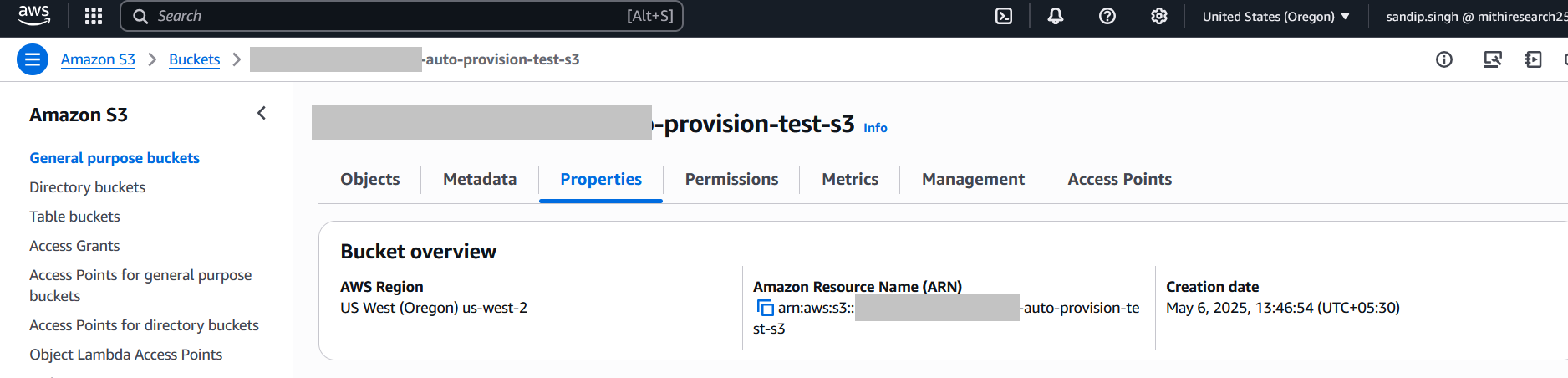
Go to the S3 bucket and open the Properties tab.
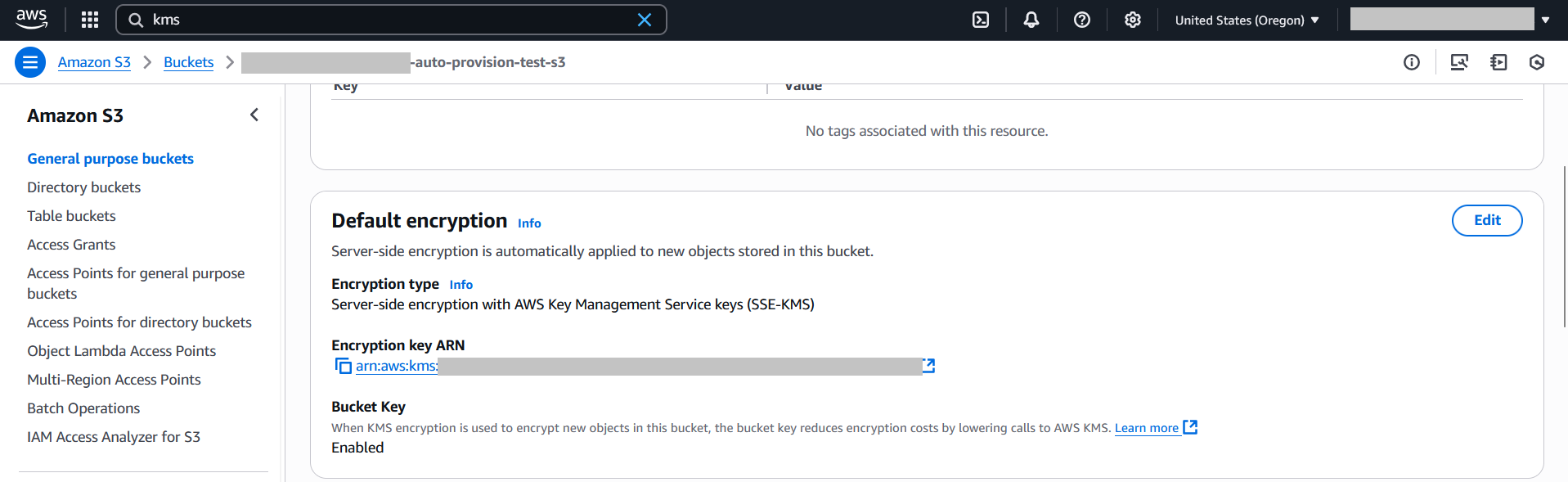
Under Default encryption, ensure it is set to SSE-KMS, and Bucket Key is Enabled.
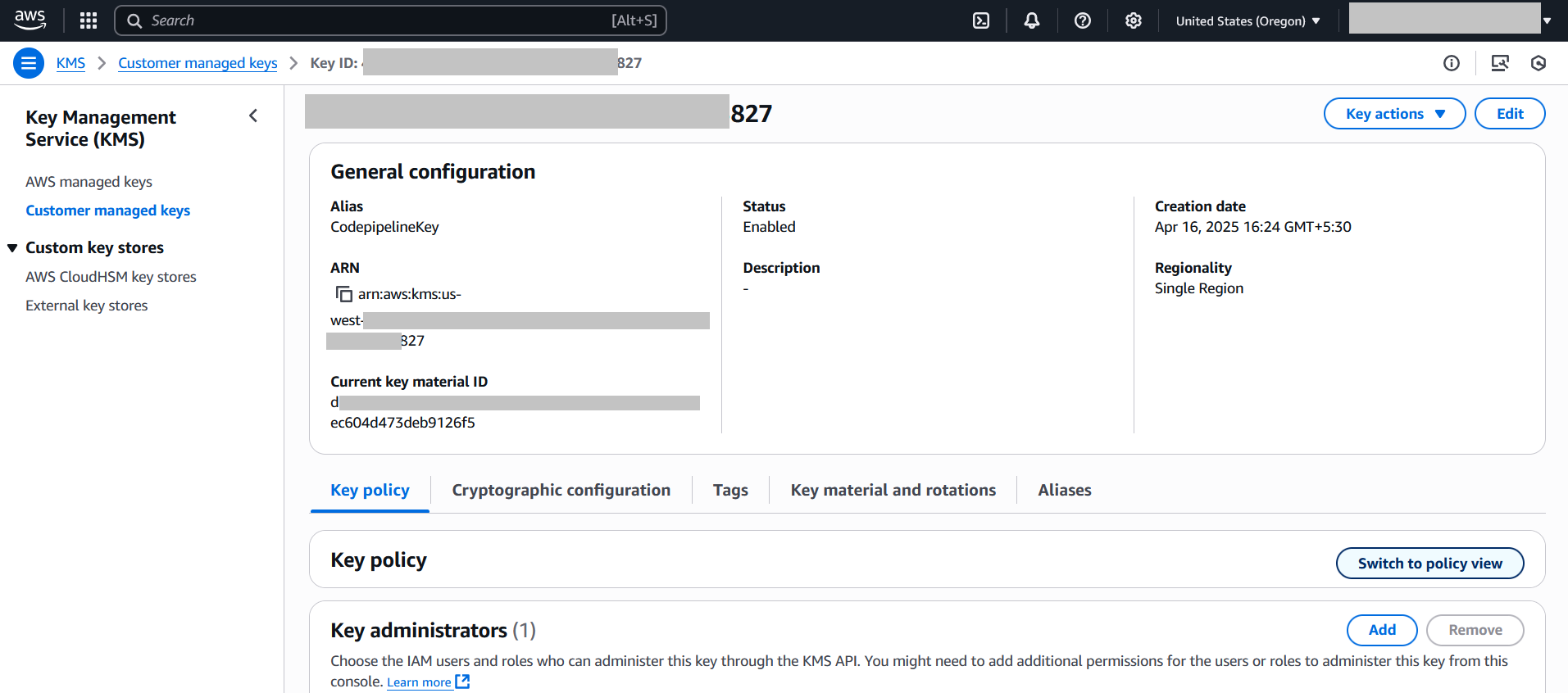
Click the linked KMS key name to open it in the KMS console. In the KMS key page, go to the Key policy tab and click Switch to policy view.
Click Edit, scroll to the end of the policy, and add the following statement:
{
  "Sid": "AllowUseOfKeyByLegacyFlo",
  "Effect": "Allow",
  "Principal": {
    "AWS": "arn:aws:iam::<LegacyFlo account>:root"
  },
  "Action": [
    "kms:Encrypt",
    "kms:Decrypt",
    "kms:GenerateDataKey*"
  ],
  "Resource": "*"
}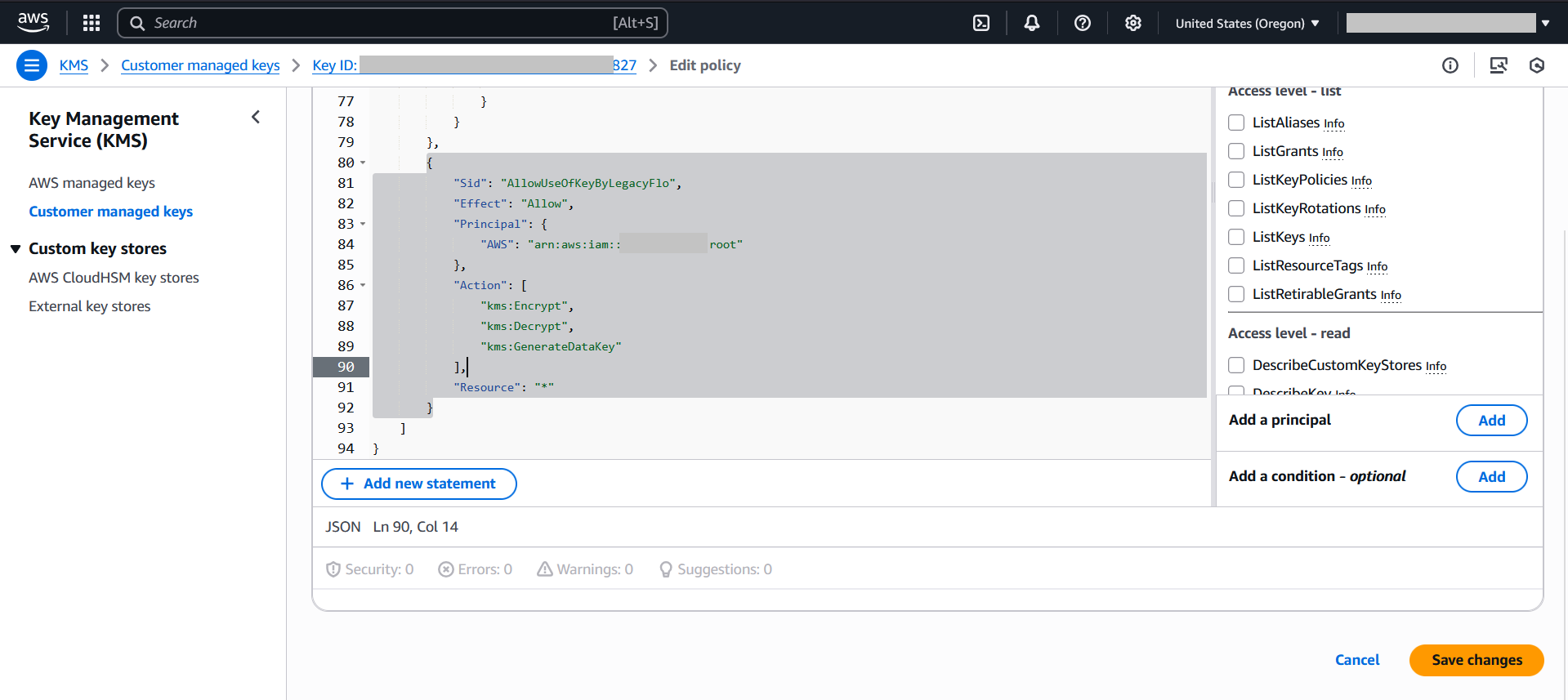
Click Save changes.
NOTES:
1. <LegacyFlo Account > in the samples is the account where LegacyFlo, the ETL tool embedded in Vaultastic runs. This value will be provided by us in a secure manner. Contact us via the helpdesk
2. <Customer S3 bucket> has to be replaced by your bucket name.
Can I revoke the permissions to access my S3 bucket?
Yes, after the the task is over, you can revoke the access by removing the policies.
How do I download files from S3 bucket using AWS console?
Refer the Amazon S3 Console User Guide to know the steps.
How to download files created by Vaultastic / LegacyFlo on my S3 bucket?
When you give access to the S3 bucket to LegacyFlo to upload files, you may not be able to download till you disable the ACL which allows LegacyFlo access to the bucket. The steps to do so are as given below.
Note: The ACLs have to be restored if more LegacyFlo requests are to be executed.
1. Go to the S3 bucket Permissions tab and edit the ACL
2. Remove the Access to other AWS accounts and save it.

3. Go to Bucket Permissions Tab and select Edit Object Ownership and choose ACLs disabled and Save Changes.

4. Now, you can able to download the S3 objects.